2019年11月25日星期一

Useful Preschool Behavior Management Strategies

Preschoolers are the sweetest. They are curious, full of energy, constantly growing and learning. But sometimes, anyone might find this much energy difficult to handle as each child is learning so much and developing at the same time. Emotions are running wild that they are learning to master and understand while learning about human relationships and mastering their environment.
Managing preschoolers requires both extra care and attention but also discipline. No matter as a parent or a teacher, guiding children rightly or modifying their behaviors requires a great deal of patience and related professional knowledge. Here are some of the most effective preschool behavior management strategies that you can implement:


1. Apply yourself to acquiring knowledge

Preschool behavior management does not need a lot of trial and error with the right kind of knowledge. As children grow, they search for independence and they look forward to doing things on their own. This brings about new character displays.
As a teacher, use CloudBB and you can always communicate with their parents on how to handle their children when they become a handful. Sometimes even parents are clueless about what do with their children but with a free pre school management software like CloudBB which has an access to data that can give you more information about taking care of your children.


2. Pay attention to triggers

Children also have emotional triggers. When you have children in your care, you must be able to identify and prevent these triggers from becoming a full-scale problem. There are always subtle signs. For example, some children like routine and may get upset when something changes in the routine. CloudBB preschool classroom management software helps you keep track of every kind of activity your children participate in, the timing and overall response of the child.
As an after-school administrator, you need an efficient way and mechanism for what works for each child. You have to be mindful of circumstances that the child may find challenging and find a solution that works. This approach serves as a means of both prevention and cure.

 Useful Preschool Behavior Management Strategies


3. Better communication strategy

For any individual, communication is very important. But with 3 to 5-year-old, it requires different preschool behavior management strategies to understand and communicate with them perfectly. Communication should be short, sweet and direct.
When asking children questions, the questions should be direct and short. If it requires offering them options, the options should be limited to 2 or 3 so they do not get confused about what they think is the best for them. Children must know how to choose from when they are little.
When it comes to instructions, make it very simple and clear. Dos and Don'ts are one of the most direct forms to communicate such. You have to do this with gestures too. Some children might need an explanation for the instructions, so, you must be able to explain such in the simplest ways. Please note that the communication between teachers and parents are also essential when conducting preschool management strategies.


4. Reward and support good behavior

Preschool classroom behavior management is a skill but some principles work like positive reinforcement. When children do what is right, they must be awarded appropriately for those actions. By doing this, the child is encouraged to such actions more.
Rewards can include sweet words of affirmation like "Good boy or thank you for helping to put the books back". You could say things like "look how happy your friend is because you share, sharing is good". These words encourage the child to engage in for positive activities rather than causing trouble.


5. Demonstrate important social skills

During these formative years, children must learn the most important social skills, several activities help build such skills e.g. Empathy. The activities can be scheduled into the pre school management software which makes it very easy for you to keep track of every activity. Example of such activities are games that involve playing with other children, handling winning or losing or sharing toys.


6. Emphasize clear behavioral guidelines

In a classroom setting , you should have clear behavioral guidelines that children can recite regularly. This is to mentally reinforce the right responses and actions of children. One of the ways to monitor this is to have sticker charts or stickers given to children when they do what is right.
The stickers can serve as a guide to establishing actions that may be perceived as right or wrong even by the children. With time they know the best actions to take and you can then introduce the charts to other behaviors that need guidance.


7. Address challenging behaviors

Actions have consequences and every child should understand that. Wrong actions come with consequences children may not appreciate but is necessary to foster discipline. Our preschool management software can help after school administrators communicate with parents or vice versa on how best to approach challenging behaviors. Some corrective measures include taking away privileges or putting the child in timeout.


Conclusion

Behavior management is easier with the right strategies. Implementing some of these and monitoring with the right technology just made childcare a lot more interesting. Become part of the CloudBB family today and find a system that works for you.

 

Related Articles

2019年11月17日星期日

The Top 5 Attendance Apps That Simplify Your Childcare Management

There are a lot of attendance apps out there on the market. Some are free while some are sold at a price. But the major questions remain. “Which is the best? Which of them can I trust to meet my need and ensure the safety of my kids? Do I get what I pay for?” Well, to answer these questions, we have put together some of the top attendance apps that can simplify your childcare management.

• LifeCubby

LifeCubby is the cloud-based childcare software that optimizes the executives' framework. Significant highlights incorporate day by day class sheets, exercise plans, and reports. You likewise have choices for computerized registration/registration, supper following, and catching photographs and recordings. The product utilizes SSL encryption procedures, firewalls, and robotized reinforcements to guarantee information security.
LifeCubby has an adjustable application where childcare staff can share photographs, recordings, alarms, and reports on the children's advancement with guardians.

Advantages

Capterra analysts love the photograph, and video includes just like the specialized devices Clients additionally notice that the product is anything but difficult to learn and can deal with numerous kid accounts.

Disadvantages

A few analysts on Capterra notice that the product produces blunders when two children have a similar name that makes getting the right kid troublesome. Users likewise referenced periodic application stops and moderate speed.


• CloudBB

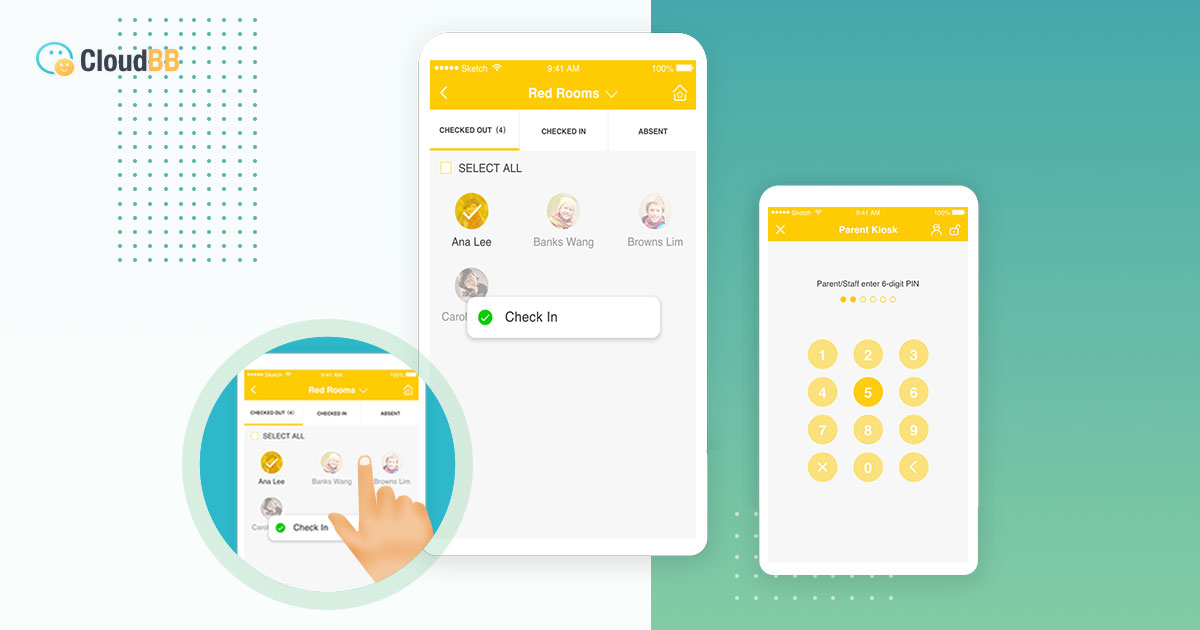
CloudBB is a free online attendance tracker with a great reputation as it is a safe and comprehensive afterschool solution. As for its outstanding attendance tracking feature, check in-out has never been so simple without any printing sheets. Also, parents and approved pickups can complete check-in as they walk up to the learning center. What it does helps to improve efficiency and increases the credibility of after school centers by features like online registrations, secure pickup, check in-out , an invoicing plan, parent connections, marketing, and a whole lot more.

CloudBB- Top Attendance App 

Advantages

√ Staff can check students in-out in a hassle-free way and even track live ratios for every room efficiently.
√ Secure student check-ins can be completed by using unique sign-in PINs and signatures. No more complicated printing check in-out sheets with illegible parent signatures.
√ Drivers can complete check-in when picking students up. Drivers can even receive notices of last-minute changes on the BB School app and SMS on their mobile phones.
√ CoudBB gives administrators detailed information about facilities that are in use as it is possible to record and manage absent records along with detailed notes. No longer hard to track each student's total school hours with pickup status and attendance details. It is also easy to generate invoices for actual pickup services, charges of consumed class hours, and more. All these improve the credibility and transparency in the institution and more importantly, such an attendance app greatly simplifies your childcare management .


• Kinderlime

Kinderlime is also an attendence tracker that enables day to mind focuses and afterschool projects spare time and exertion. The product replaces paper sign-in sheets and participation following computerized sign-in/sign-out. It produces solicitations dependent on what number of classes every student visited. Guardians can pay bills online through the product.
The application enables you to send guardians photographs and month to month bulletins. Kinderlime additionally supports promoting endeavors by incorporating with Facebook and Google Plus. Guardians and instructors can get to the product on their cell phones too.

Advantages

The sign-in/sign-out component is the most adored element of the item and cautions guardians by means of email about their tyke's day by day schedule. Some commentators additionally love the client administration and ease of use of the product.

Disadvantages

A portion of the analysts notices that they might want to see extra highlights, for example, spell check added to the bulletin. One of the analysts composed that creation amendments to sign-in/sign-out occasions can be dubious.


• HiMama

HiMama is a childcare application that enables guardians and tyke to mind focuses impart. The product takes photographs and catches the video of the child and sends them to guardians. It likewise sends guardians reports and messages with significant updates. There is additionally a versatile benevolent parent gateway.
HiMama is a far-reaching arrangement and offers different highlights; for example, participation the board, booking, exercise plans, and schedules. The product can import information like contact subtleties and medicinal records from different stages, just as give web-based preparing and 'how-to' recordings.

Advantages

Guardians love the top-notch photographs, recordings, and the consistent commitment with daycare focuses.

Disadvantages

Some users reflect that they have troubles in looking down and including/seeing remarks while utilizing the product's versatile application.


• EZCare

EZCare software computerizes enrollments, expense accumulation, and revealing. It tracks child get/drop-off and calendars classes and exercise plans. The shortlist the board highlight encourages you to augment program enlistments.
EZCare stores and tracks child information, for example, family data, calendars, participation, and therapeutic records. Combinations with email and telephone messages improve parent-staff correspondence. The product likewise offers bookkeeping and installment preparing highlights. You can deal with different focuses with a solitary database utilizing EZCare.

Advantages

It proudly offers online enlistment, e-installments, finance, and adaptable reports.

Disadvantages

Not as many reports available yet but they continue to add more all the time. Sometimes reports can be a little difficult to get the exact results you need. Its reporting feature needs urgent improvement.


Conclusion

All these and many more are available when you get free sign up with CloudBB attendance tracker app. You will definitely receive the best childcare management service besides digital global absence tracking. Make the right choice today!


Related Articles

2019年11月13日星期三

Top 5 Teacher-Parent Communication Apps for Better Childcare

Elementary schooling has a lot of intricacies and requires attention to details or information such as tuition fees, students' data, lessons child pick up time and others. When not handled properly, it can lead to a ripple effect of negative events. Most times when a breach in information occurs; difficulties in real-time communication between parents and teachers serve as the major contributing factor. Teacher-Parent Communication apps emerged as the remediable factor to this myriad of problems, helping teachers communicate with parents effectively and seamlessly. Some apps outperform on the market including:
They can act as school-parent communication apps to foster parent-teacher communication, with no need to make a complex modification to parent-teacher schedules. The apps operate with easy features that help in improving parent-teacher communication to a high degree.


• CloudBB

CloudBB is a multifunctional parent-teacher app that has helped to improve parent-teacher communication over the years by providing a platform for continual interaction between parents and teachers, for improved childcare. Its powerful features related to this include “Parent Connection” and “My School”.


Top Teacher-Parent Communication App


Parent Connection: It is a portal to connect families to their child’s day, which keeps parents in the loop with their child’s activities throughout the day by viewing real-time photos, videos, and notes posted by teachers. If the family has multiple children, add all children into CloudBB so that parents can switch schools to view children’s activities within a few clicks easily. Furthermore, it is possible to share each child’s precious moments with other family members.
My School: CloudBB takes pride in its all-in-one after school management solution which facilitates to manage all staff, student data, rooms, lessons, and much more merely in one place for after schools and childcare centers. You can track where students and staff are signed into, push classes on your online registration page , get accurate reports for pickups, attendances and more, assign various roles and profiles to staff, etc. More importantly, real-time changes can be sent to the school's driver to ensure that all assigned students are picked up promptly.
The features mentioned above allow for the management of staff-student data as well as effective control of lessons for afterschool and childcare centers. Stakeholders can monitor this activity from anywhere without any form of hassle or struggles.


• Bloomz

Bloomz is an effective teacher parent communication app that helps teachers, schools, and parent communicate effortlessly. Parents and teachers can communicate and coordinate activities through calls calendar and reminders, parent-teacher conferences, volunteer item signups, behavior tracking. Through daily quick updates, video sharing and photo upload, daily sheets and reports, a record of all activities like naps, potty meals and more are monitored on the go! This helps to save time and engage parents through streamline communication. Bloomz is top-rated because it is award-winning; year after year, it is nominated for awards which it wins. But some users reflect that Bloomz may not be easy for parents to navigate who struggle with manipulating digital technologies.


• Kinderlime

This parent communication app is an app that helps parents connect with teachers effortlessly. It provides easy childcare on a simple platform. Activities such as meals, naps, and so much more can be communicated between parents and teachers in real-time through this app. This is not all, the weekly curriculum can be planned while the students' progress is being tracked simultaneously. Waitlists can be managed through communication with the potential families and daily school administrative invoices and payments can be operated, managed and controlled through the effectiveness of the Kinderlime app.


• Brightwheel

Being a platform for early childhood education, Brightwheel school-parent app is effective in managing classrooms, observing students, collecting tuition, staying in touch with families all in one go. Licensing requirements can be met while automated invoicing , payment of bills, management of staff and track enrollment can be monitored as well. Parents and guardians can also keep up constant communication in real-time with teachers through messaging, videos, pictures and so much more. It is employed by a lot of school owners in an administrative function, to maximize time and achieve the best of results. Also, you run childcare centers and build a solid teacher-parent relationship with the Brightwheel app in a hassle-free way.


• HiMama

HiMama daycare app is also among the apps that help teachers communicate with parents. With this app, you don't need to engage so many papers in your daily administrative focus. Digital daily reports between childcare owners and parents are utilized. The digital daily sheet often includes meal times, naps, as well as other activities. Developmental observation with skills can also be effectively monitored through HiMama. This is not all, student billing, staff ratios, and management as well as real-time video and photo update are important aspects that are covered through HiMama. Learning stories and parent engagements are synchronized through the effective features of this app, providing a perfect medium of the relationship between parents and teachers.


Conclusion

Since communication in real-time involves live communication that occurs without transmission delays, it is almost near-instant with minimal latency. These preschool apps reviewed above has proven to be effective solutions, bridging the gap between lapses in communication between parents and teachers, thereby serving as the best teacher-parent app that you can trust. They simply help you go digital and embrace change, without the slightest discomfort, stress or hassle.


Related Articles

2019年11月11日星期一

Best Free Daycare Software 2019

What is daycare software?

The daycare software is the software developed for managing childcare centers, preschools and early learning environments, from learning and development updates to employee management, invoicing, and child portfolios. Daycare software is used by early childhood professionals to track a child’s development, communicate with parents and manage the day-to-day running of activities and the staffs.

The daycare software has made it possible to do all these with no need to put in much stress through these aspects:
- Improve parent engagement
- Help save time for everyone
- Further ensure safety and security

How to choose the best free daycare software?

There are several factors to consider when choosing the best free daycare software that can improve your daycare management. Here are some useful tips for you on this issue:
- Ease of use: For any daycare software, you have to consider the convenience of navigating through the software features. If childcare management software has essential features that you need but has a confusing interface, you run the risk of purchasing software that your staff will not want to use, therefore reverting to the old ways and that will be a waste of time and money.
Make sure you choose the easy-to-use software that is aligned with your experience on technology. You will end up not getting the value out of expensive software that is hard to operate.
- Purpose: There are many daycare software systems available, with each one targeting a different userbase. Some are meant for parents to monitor their child’s location, while others are meant for the use of daycare centers in managing incoming and outgoing visits. You might want to consider one that is good for daycare daily report.
Make sure you carry out thorough research on which software fulfills your requirement and make a choice based on what you specifically need.

Best Free Daycare Software

- Customizability: Customization is important for a modern-day software user. The daycare software is no exemption to this rule. Make sure that your daycare software choice is the one that allows for great flexibility. A good brand will always put the customer’s needs first and develop a product that will solve your unique problems. It is your right to request for customization, and not a privilege.
- Value for Money: Expensive software doesn’t mean effectiveness. Make sure you go for the one that meets your specific requirements and provide the best value for money. If you find software that will satisfy your needs but exceeds your budget and isn’t worth the investment, then consider the one that best suits your pocket.

3 Best Free Daycare Software

Now that you are aware of the factors to consider when choosing the best daycare software for your use. Here is the top 3 daycare software for mac or any other device.


1. CloudBB

CloudBB daycare management software is one of the best choices for most childcare centers because it provides a comprehensive and safe solution. CloudBB helps you to improve efficiency and increase accountability at your daycare center by staying in connection with parents throughout the day. It is the best daycare management software for childcare centers.

Features

- Secure Pickup: Parents can see the time when their kids are picked up, and the software helps drivers receive real-time changes to ensure prompt picking up of all assigned students.
- Online registration: The software helps to minimize entry of enrollment and registration data when integrated with the daycare center’s website. It makes it easier for parents to access and fill out the daycare enrollment form.
- Parents Connection: Parents can catch up on their child’s activity and precious moments through the app, and they are aware of their wards daily involvements.
- Check In-Out : Guardians, approved pick-ups, or even parents can complete check-ins while on the way to the daycare center.
- Marketing: This software makes it easy to plan your marketing campaigns accordingly for increased enrollment potential.

Pros

- The secure and real-time student pickup system
- Comprehensive afterschool solution filled with useful features that manage classrooms, handle administrative tasks and stay in touch with parents, all without stress
- Customizable platform to meet unique needs
- 30-day free trial with free sign up , brilliant features and an affordable & cost-effective pricing plan


2. EZCare

This childcare tool comes with different functions such as scheduling, billing, enrollment, and parent engagement. It has a parent portal and mobile app to help family engagement. It is especially a piece of good daycare software for mac.

Features

- Registration and enrollment
- Online billing and payment processing
- Payment Portal
- Scheduling and attendance
- Data management, reporting, and accounting

Pros

- User-friendly
- Great customer service
- Online payroll, registration, e-payments

Cons

- Its add-on features require more payment from users
- Is unstable, especially the reports feature


3. Sandbox

This free daycare software helps users manage their center operations by assisting them in automating functions such as recordkeeping, payment processing, managing attendance, and handling communication with parents.

Features

- Online registration
- Child immunization reminders
- Online payments
- Billing and payment processing
- Automated Billing mode

Pros

- User-friendly
- Recordkeeping
- Payment processing
- Communication with parents

Cons

- Occasional app freezes and slow speed
- Errors may occur if children share the same name


Conclusion

The days of struggling with keeping track of activities as daycare manager are over. You can now manage operations like scheduling, billing, and recordkeeping effectively. After going through the pros and cons of the different options of daycare software you can choose from, we strongly recommend that you choose CloudBB owing to its comprehensive list of features and benefits it provides for everyone, from the parent, teacher to the driver. It simply makes everything better and easier.


Related Articles